
 4:29
VIDEO · AI & automation
VIDEO · AI & automation
The YouTube player loads only when you press play. Prefer YouTube? Watch there ↗
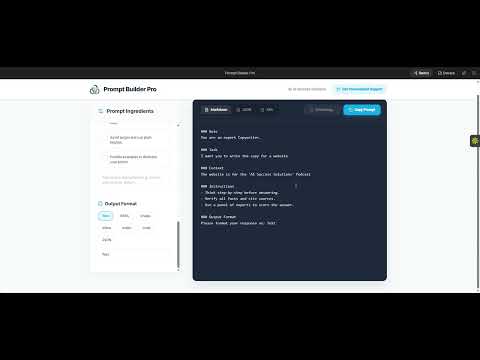
Hey there, and welcome to this short quick tutorial for Prompt Builder Pro. And this is a tool by AI Success Solutions. And so you see over here we have our ingredients, and then over here on the right it's actually going to have a a prompt that we can go ahead and copy right into our own AI tool. And so over here on the left we've
got our role. Do we want it to act like a fact copywriter, a fact checker, an educator, an engineer, or we can type in our own custom role. So we're just going to choose copywriter right now, and we're going to save it to the task for the goal. I want you to write the copy for a website.
And then we can also put in here the context, and we can uh the website is for the AI Success Solutions podcast. And we can give it more context, and I'm going to encourage you to give more context there as well. And then you'll also have an opportunity when you actually feed it into your AI tool to upload uh other documents and images and things like that, which I would encourage you to reference in here. And then we have some key
instructions, and these are just things that uh are helpful to add in, especially if you are doing certain uh projects like a website. You might want to have them think through step-by-step, and this helps them to be able to uh to think through and make sure that that step one in part one is correct and doesn't contradict or um you know, mess up part two. Uh verify all facts and
cite sources. That's a a great one to add on there as well. I like the panel of experts um to look to help them improve it. And then we have a couple of other ingredients as well. And then you can have it ask for what you want it to give it out. I'm going to say text. Uh I want it to put it out in text. And then we've
got our prompt right here, and we can export it and copy it in markdown. We can export it in JSON or XML, whichever format we like. And then we might even say enhance with AI right here, just to give it a little bit of a bump, and see what happens if we can improve it just a little bit more. And that'll happen and
work out in the background as well. We'll wait for that to come back. So, we've got our enhanced um prompt here. It says, you know, it spiced up the or the role a little bit. Spiced up the task. Um we got some extra things and I would go in here and and make sure that all of these are accurate in what you actually want it to do.
Um and then all of this output right here, right? So, again, it took the sort of basic It sort of took the basic prompt and put it into something a little bit more detailed um that you can continue to adjust and massage for yourself as well. And of course, if you want to get personalized support and help with this, there's a spot right here to schedule some time with us and our team. And if
you have any questions, feel free to uh send those to us as well so we can continue to make this a better tool for you.
4:29
VIDEO · AI & automation
 1:24
VIDEO · AI & automation
#aiforbusiness #aiforbeginners #aitutorial
Let’s chat about utilizing content to increase your visibility and strengthen your industry connections.