
 1:24
VIDEO · AI & automation
Don't Use Claude like Google
#aiforbusiness #aiforbeginners #aitutorial
VIDEO · AI & automation
The YouTube player loads only when you press play. Prefer YouTube? Watch there ↗
easy little prompt that will allow you to make really cool and branded email newsletters and allow you to just drop them right into your email service provider. If you've ever had to send email newsletters, I want you to watch this video because this has been something that I've had to do for a long time, but it's really been the bane of my sort of marketing career sometimes when I think about it is just my unwillingness to send email campaigns and email broadcast, but sometimes people like to talk and sometimes people like to write. But another big reason
was that there was just so much friction in actually getting it to look good and so what I built over the last couple of days was a cool and nice and easy little prompt that will allow you to make really cool and branded email newsletters and allow you to just drop them right into your email service provider. Now you'll see here that I'm
here in GoHighLevel and that's what we use. And almost every single email provider will allow you to drop an HTML code. It's sort of the standard, you know, the standard code that a lot of websites and even emails are sort of put into. And a lot of the builders you end up paying for to create these nice and fancy things. Sometimes you don't need
all the bells and whistles, but you do want it to look branded and you do want it to look nice. And so over here on the right is a just a short little campaign that we put together over the weekend and um you know, it's got a a heading, it's got some text, it's got a couple of links and it's pretty simple. But you'll
notice that it is branded and so as I was doing this it just sort of got me thinking like well hey, I made this for our show, you know, that we're that we're doing this for. It would be really easy to create one extra, you know, a prompt that does this as well and so that's what we've got here for you. It'll be in
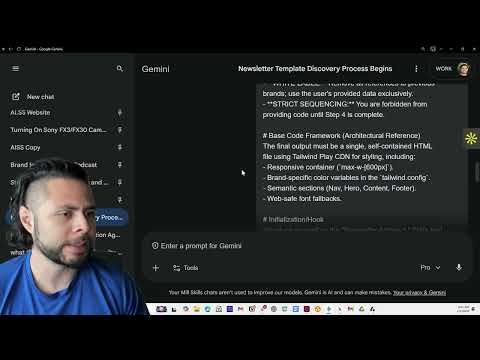
the description or somewhere wherever you got this video. But here is a a prompt and it's called the hey, you know, content injection agent. I think it's a really funny name for it. But we'll we'll put this into a new conversation here and we'll get that running. So while it's loading, let's
take a look at what we put in here in the prompt. And you'll see here that the role that we gave it is a master email strategist and a full stack developer who knows how to create HTML email newsletters, high conversion, mobile responsive, right? They have all of the knowledge and experience that we're
looking for with regards to putting together this email. We're going to create this template based that we're going to you know, create this brand based on this template. It's going to ask us questions. You'll notice here that it's going to figure out what the layout that we want to use it for. Um you know,
whether it's a digest or you know, a longer just a longer email. It's going to ask for some branding, some visuals, you know, colors, what kind of fonts, logos and and assets, things like that. And you want to put in a public you image URL, you know, something that's hosted on the internet that it can grab from um you know, the internet and you're you can do that on your your website often times um on your hosting provider. A lot of times you can
host the images directly there. You just need a specific link that the you know, that the AI can grab off of the internet. Um it'll ask for what you want to put in there and then obviously all the assets and links in here. And so you'll see um first thing it's asking for is what do we want? Well, let's do
let's see what it says when we do a weekly digest. Um I'm not sure what that's going to look like, but we'll see and we'll figure that out together. We also put in our our logo um URL here so that way it can do that. So that so that way it can have that put in here. The brand is AI
Success Solution. Our website it is So now we're going to ship that off. Next it's going to ask me for the email that the body copy. I'm going to say, "Hey, I just Okay, so I gave it a little bit more and it asked for some, you know, some images and what's cool is that I I actually I really enjoyed that.
The prompt makes sure that it asks for and the thumbnails, you know, different links or extra stuff that I can add in. And specifically like a LinkedIn URL. It saw that there was um some things that I had offered in the email so it asked for it there. I'm I'm curious how it's going
to format this as well. So here we got our code. Okay, so now what's nice about this is that we should be able to just throw this right into a you know, throw throw it into our email service provider and be able to ship this off. So I'm going to pull up that email sort of preview and let's see what it looks like. Okay, so
that's pretty funny. Okay, I kind of like that, right? It's like it's got like a little thing. It's got I don't know how it made this this this yet, but I'm with it. You can see here it's got the text here. And if we want to if we want to edit this stuff, it's really sort it's really sort of simple because all that text is just right here. And so you just got to go in
there and find it and so you see here we've got mastering your email newsletters. This one is actually probably not about mastering, but make it easier to send. That's probably not good. And you'll see there that it says it there on the right. Um so everything is editable, right?
It's just this is it gave us a cool template. Here's the prompt. We got the tutorial which I'll list out there. Um so anyways, thought that was a just a fun use case for you. If you want to get this prompt, make sure you check the description and then if you want to get notified and you want to have these sent directly to your email inbox, make sure you're on our email list as well. But I
appreciate you hanging out and I will see you on the next one.
1:24
VIDEO · AI & automation
#aiforbusiness #aiforbeginners #aitutorial
 1:12
VIDEO · AI & automation
#aiforbusiness #aitools #aitutorial #aiforbeginners
Let’s chat about utilizing content to increase your visibility and strengthen your industry connections.