
 32:12
VIDEO · Podcast strategy
Live Podcast Analytics Lookin
Live Podcast Analytics Lookin How to Improve Your Show Better Based on Your Stats You can also watch at https://www.youtube.com/@hector_podcast/live
VIDEO · Podcast strategy
Want to pay for less podcast software? Me too! That's why I love Descript - it's the closest thing to an all-in-one tool for podcasters. Here's how we use it to produce and publish 20+ episodes per week.
The YouTube player loads only when you press play. Prefer YouTube? Watch there ↗
Want to pay for less podcast software? Me too! That's why I love Descript - it's the closest thing to an all-in-one tool for podcasters. Here's how we use it to produce and publish 20+ episodes per week.
what's up fam hopefully you guys are here hopefully this is getting through to you we're going to um just delay a little bit make sure that we get out to all of the streaming platforms and make sure that we are are live and ready uh my name is Hector Santi ston if you're stumbling on you're finding your way here uh for the last Almost decade I've been spending most of my days trying to figure out how to create and grow a uccessful podcast and these live streams my podcast uh much of my post is dedicated to helping you do that and on today's live stream on today's video what we're going to do is we are going to cover one of my favorite tools for podcasters and podcasting gets kind of a well there's two things to it right A lot of people see podcasting and they go oh my goodness it's so easy I can be Joe Rogan I can just sit there and talk for hours I do it all the time let me just record it well then once they actually get to
the next part which is actually doing it consistently uh actually getting in there recording or the other side of it is actually the tech part right the tech side the the editing the uploading the publishing all the the promotion all these other aspects of podcasting that people don't always factor into it but the challenge is that if you don't do those parts of it you it's very very hard to have a successful show there's there's so many more shows out there that in order to to really stand out and in order to to compete you are going to um you're going to need to to raise your level of standards and so with that being said one of the things that one of the reasons that I enjoy um or one of my favorite tools is descript and and that's because there can be so many different tools that you can use you can have a recording software you can have an editing software you can have a video software you can have a transcription
software you can have a an AI software you can have um you know an automation software there's all these different things that you could do and and are they are they valuable for sure are they important they can be are they necessary well once again it depends but but what's nice about what we're going to talk about today is the the tool that we're going to cover specifically which is descript my favorite one I don't know if I've L the secrets out but it can do a lot of those things it can do a lot of those different things as well um all right I want to check in and see if we're here see if we made it anywhere we like to do these live here because if you guys have questions um if you have anything that uh you guys want to get into specifically we can definitely do that if you guys are catching this by some strange reason live or even if you're on the recording would love to know where you're tuning in from um
would love for you to just drop your your city your state your um your your your area code I don't know I'm just curious where people are tuning in from and uh what parts of the world that we're reaching okay so we're live live on Facebook uh are we live on um I don't know if if we are are live on LinkedIn it doesn't look like LinkedIn is live but that's okay and then we're also live on YouTube so if you guys are not subscribed and Twitter so if you guys are not subscribed or following me there uh definitely go check it out all right let's hop in though and let's take a look so we're here in descript and one of the reasons that I really enjoy like I said descript is that it allows me to do a lot of different things things so one of the coolest things that I think is is probably important to talk about as well is that descript and squadcast have a partnership so squadcast um was just bought out by
descript and so now what's cool is that for the price of one you can see up at the top for the price of one you get both and we like i' I've started using squadcast since this merger and I really enjoy it it is uh it's easy it's simple they've kind of got everything that you need and um you know what's great about it is that a well it's free um because if you're already paying for the script you get to you know you get to use it but what's also nice is that they they're they're connected right and they talk to each other really really easily and so um we're not going to talk too much about squadcast today but when it comes to recording software what's also nice is that when you do utilize the script or you you do use the script you get a free subscription to that and um hopefully that stays like that um um you know maybe they'll eventually merge into you know one sort of thing but something that you can take
advantage of for sure so let's hop back into descript and one of the biggest things is that if you guys are not kind of familiar with how descript works I think that's probably the first place that we'll start and what's nice about descript is that you can edit a you can edit a podcast just like you would edit a Word document and some of you guys have have kind of experienced this but I still talk to people today who haven't haven't figured out that like this is a thing now you'll see down here at the bottom most of you guys are used to seeing these waveforms and most of you guys are used to um seeing these types of uh you know these types of waveforms so a lot of times in most audio editors this is kind of what you'll be looking at is this sort of wave form here now what you'll notice and you can already see how how it's how the descript starts to work is that it adds the transcript right on top
of it so you can see like I'm going to um I don't want to screw this up I'm going to create a a Sandbox composition here so we can kind of mess around with this so you can see here if I want to just like let's say I go in here and I think you know so let's hop back in here what's nice is that I can go through and I can just as if I was cutting out parts of a a Word document if I wanted to go in and just hit and just remove that you'll notice that it removes it from here in the transcript and then it also removes it here from the the timeline and so what's really cool is that you can now go through and read this as if it were a um just a transcript and if there's any big flubs if there's any big mistakes if there's any gaps if there's any sections entirely that you thought would should be removed all it takes to do that is it just takes a simple highlighting and I'm doing control backspace so you can see
that I deleted it but if I just want to hit backspace it pulls it out completely right there and so it's really easy is that you can remove entire sections of the um the audio just by the words right you can actually time it up to the words and the transcript is very good it's not perfect of course there are some things that it's not going to catch and some technical words that it's going to miss but generally speaking it's it I mean it's like 90 95% great and so you can get a very very good idea just by skimming it uh as well so just to give you a little bit of a tip on what we do when when we're when when I'm specifically content editing I will go in here and I'll turn it up to double speed the first time through and then if I play it you'll notice that it'll actually highlight the words in the transcript as it's playing and so I'm able to kind of see the words I can see the waveform and
I can hear it so I've got these three different ways to know whether or not something should actually be there and so that first phase is really really uh really um easy to do because you can do it at a at a higher speed and you can see visually the um the text there and so that's when we're cutting out a lot of the big stuff do we keep the questions is there anything that you know did they have to take a bathroom break like that sort of stuff is really easy to go in here and you can see and you can just highlight and remove with a backspace another really cool thing so another really cool thing from um uh is the filler words right um is and what you can also do in here is if I go in here into tools uh I can go in and I can remove filler words and what's nice is that you'll see here that it has it goes through and it automatically finds the filler words like uh um even the the smaller ones
like like so you know these other ones and it'll actually tell you how many are in there and then it pulls out all these other ones too and I think that the some of those are at on higher um you know higher tiers or higher kind of pay plans I'm not really sure um but you'll notice that it can automatically remove a lot of these um a lot of these words you can remove them all or what's nice is that it can just highlight them and you can pull out the ones specifically that you want because some people like to be you know have it a little more free flowing and they like to have uh you know a little more natural conversation I guess which is still possible without the filler words but you don't have to remove them all it's not just like one one Fell Swoop um what's nice is that there's there's a couple of settings in here and then you can even have them delete it or you can um when it says ignore that's like the
uh the cross through so that way you can still see where the the you know the things that are removed are are okay so that is um so that's a really good just simple tool that I think everybody can benefit from I'm going to hop in and see if there's any questions here anything uh um any questions that you guys have cuz we're just going to kind of walk through some of my favorite features here on Des script and see if there's anything worth uh worth noting or anything that you guys want to get into specifically as well so I mentioned that the editing is really really for me is um is why we really fell in love with it at first and so the second part after I go through um after I go through and sorry if you guys can hear the the gardener will always seem to come around this time uh when I'm streaming that is so what's also nice is that I can edit from the timeline and if I want to go in here and I want to just grab this word I
can extend this word I can just delete this word entirely this kind of segment here are all really easy to be able to just edit right here from the timeline uh you'll notice that because I removed some of the filler words um you'll notice that there's some gaps in here and so I can go in and smooth those out I can I can also edit right in here as well uh there's some ways that we can kind of cross fade and make some things a lot easier but or a lot smoother sounding but this timeline is a really great place to dial in a lot of the details right because the the transcript once again it's not going to be perfect there might be times where it removes filler words and it makes it a little jumpy and so that's why we go back and we smooth these things over and um that helps with uh the flow and the natural sort of conversation so there's some tools in here and I don't want to make this a descript tutorial really my my goal is
just to show you what's possible here so before we kind of move on what's also nice is that one thing I really love about descript is it has AI built right into the transcript now before AI before descript had this kind of feature we would take the transcript R we had to use a lot of at one point we were using a lot of different programs and tools to be able to do you know what it is that you can do here but now it has everything built in so we would take it to another tool we would like upload it and transcribe it and then put it into chat gbt and like all these sorts of things to try and and and get AI to know what the episode was about but what's in here and what's nice is that I can just ask Ai and it has some it has some things that we can like some preset right so it has to remove retakes add chapters edit for clarity obviously the filler words we talked about um add scenes by active speaker so all these
things that it can actually do um like automatically right and then what's nice is that it can even write stuff for you so it can summarize it it can suggest titles social posts like right in here all the things that uh you know you could you could do like with chat GPT or any of these other tools but what's nice is that descript has it already built in and it seems like descript has a really good understanding of the transcript as well that was something that we saw in other tools is that they didn't always know what the transcript was about or or that they had a hard time kind of identifying it or even another thing that the script knows is it knows which speaker is saying what and so that's really helpful too because a lot of tools didn't have they didn't know what like the transcript wouldn't carry over the speaker um the the the speaker titles or like who you know who was saying it and so that caused a just a
little bit of confusion with the AI because it didn't know who was saying what so all these things in here YouTube description show notes find good Clips this is something that we actually use a lot right here is the find good Clips it says find five options for Clips I can pull from the CP each clip should be around 30 seconds long so you can adjust that or modify it however You' like but now ai is going to go through your transcript and it's going to find those things and going to find those clips and we'll see how it works here but from how it's worked in the past and they're always making updates and adjustments to it it's you can still see it's in the beta but from how it's worked in the past it'll actually give you the time stamps and then make it really easy for you to go and turn those into Clips or shorts or you know reels or whatever it is and while this is working and while this is thinking I'm
going to hop back here one of the the things that I think is really important for for podcasters to kind of understand is that the the podcast is really the it's the beginning right it's not the it can't be the end all be all um or else it's very unlikely that uh people are going to find us or that's going to create anything sort of significant so what do I mean by that well your podcast like can't be it there's got to be something that either points back to the podcast like um you know promotions on social media you guessing on other shows a community that you've got so all these sorts of things to help you take the podcast take the value that was in there and then to extract it and share that with PL clients prospects leads uh people in your network current customers things like that to help stay engaged so here here's what it came back with um so here are the clips you requested so let's see it says select
and script okay so boom so we got them right here so we've got this part right here I'm G to oh and what's nice is that I can automatically duplicate to a new composition how cool is that right so I've got so you can see here it's highlighted it's got these clips and I might I might adjust it or might to do a little bit differently but I can actually automatically duplicate it to a new composition or I can copy it um this is really cool I I haven't seen this part so I'm just going to duplicate that and you'll see there's the new composition now I've got this right here right and it's just the it's everything that we had just pulled and what I think is also nice is that if we want to add on more like we need to add a few seconds on we still have all of the original stuff here so we're not it's not stuck here we can go back and we can pull on more on the front we can pull more in the back we can go through and
um you know if we want to we can go through and pull out that part of it and leave the rest we can pull out this Gap if we want so all the same thing all the editing stuff is really really easy to do right from you know right from the clips so that should save you lots of time from going through and having to scour an episode or go back and remember you know out of those five maybe three of are good maybe two but at least you're getting a starting place and now um you have a a little step up instead of having to do everything from from scratch okay so let's um let's go into a couple of other things that I really like here about descript so one feature that I really enjoy from descript is this ability ility to to record right into the the segment now what I what I mean by that is that let's say I have a particular part and let's say that let me hop back to this here so let's say I have you
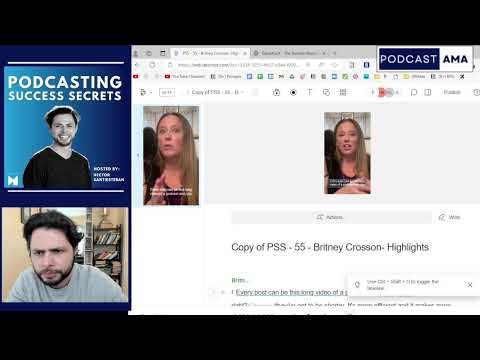
know I want to do an intro to this episode because this is just a regular you know a regular episode well what's nice is that I can just hop right in here I can hit this record button and it looks like it's not recording on the on the web app um so that's interesting um I thought it was but so the desktop app what you can do is you can just record and it'll record right into the script or you can replace parts of the script with it but that's really really simple uh and really easy so maybe we'll do a different one different tutorial on that when we have the the app open so let's hop over here and let's take a look at um some cool things that you can do with video so shout out to Britney Crossen who came on the show and talked about um social media and and some cool things that you can do with social media so what's also nice is that descript yeah it's a podcast kind of platform but it's also a
uh a video platform so if I want to go in here and I want to make my shorts I want to make my Instagram reals my Tik Tok things like that I can do that really easily so I've got my you know here's we already pulled some clips here we already went through and pull the segment um okay so that's the copy so what you'll notice up here if I go into to lay I got my different sizes so I can make it Square I can make it portrait or I can do some different ones and we're going to go here and let's just uh we want to fill it I think it allows you to fill automatically fill canvas boom okay so then I'll slide that over here boom adjust that a little bit and you can see kind of see what what it's looking like and then what's nice about it is that if I want to add text I can add cap like right on top of it um and so it'll actually have let me see if I can make those a little bigger and you'll see I'll edit that
down here so I come in here and here we go so we got our captions I want to make them larger okay that's too big let's do like 100 something like that okay so so we can see what the video looks like and now you'll see that as it plays the P the the captions right there right so you can do some different things obviously they have effects on here um you can exuse me the animations on here I believe you can make it like a uh I guess it's the style would be this this here so you can add a border you can add a background you can have the words that are are you know like the current word it'll highlight and stuff like that things like this so it makes it really easy to add edit captions if I wanted to just throw in some video up here as well I can do that I can go into media and they've got stock media up here so I can say let me throw in some social [Music] media something like that where did it
go so let's throw that media back in [Music] there but there it is so let's fill the canvas there and you can see now we've got a a video on top of it and if we wanted to just if I wanted to cut this part out I could so that it hops back to Britney and I think I might have to put like a a little Gap in here or something like that but you can see now if I want to open up with a video and then go back to Britney I can do lots of different things right you can play around with it so video is really good to use so we talked about recording we talked about audio editing we talked about a little bit about video editing of course you can do you know your full episodes here for YouTube things like that and then also the last thing that's worth talking about is the exporting part so I really love this too so just like the standard stuff so you can export it into all these different things what nice is that it makes it
really easy to export into a variety of different uh formats 4K 1080 all those sorts of things you know quality all this sorts of stuff makes it really easy to you know change the settings on that and then I really like the publish stuff though because what's nice about it is that you can publish straight to um you can publish straight to Youtube you can publish straight to you know your your podcast player all these things can go straight out to these you know these different um platforms so you see here YouTube uh and then obviously a lot of the hosting providers as well so these are are really really easy ways to remove a lot of the headache um so that's that's a little overview let's see I've been going for for 20 minutes here so I'm going to hop back check in see if there's any questions see if anything came up but um hopefully this is is insightful for you I know that for me seeing some of these
these features um it's just just it's great cuz they're always making new adjustments they're always adding different features and um it seems to be that they they are in tune with kind of what um creators are needing and and where the the direction of the industry is going so shout out to the descript team shout out to Harmony over at descript and um she is the client success person and uh just an overall amazing individual and has helped save me so much time energy Agony um from some of the thoughts and insights that she's given on the tools so hopefully these
32:12
VIDEO · Podcast strategy
Live Podcast Analytics Lookin How to Improve Your Show Better Based on Your Stats You can also watch at https://www.youtube.com/@hector_podcast/live
 33:28
VIDEO · Podcasting
How to Make Money with a Newer Show And How to Get Your Very First Sponsor! Watch on YouTube for better quality: https://www.youtube.com/@hector_podcast/live
Let’s chat about utilizing content to increase your visibility and strengthen your industry connections.