
 2:11
VIDEO · Podcasting
VIDEO · Notion & AI systems
The YouTube player loads only when you press play. Prefer YouTube? Watch there ↗
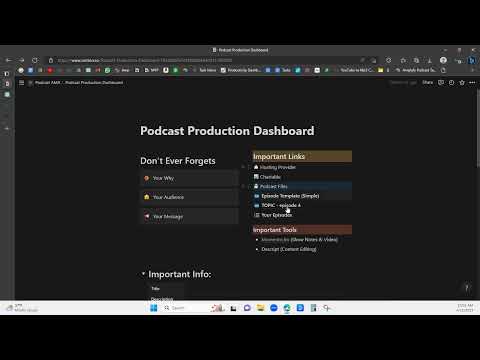
hey pod fam what's going on welcome to this podcast production dashboard and we're going to go over a quick overview of this and the reason that we put this together is in running a podcast production company we are now approaching almost 20 shows that we manage and so we are getting out sometimes over 100 episodes in a month and in order to do that we have to keep everything organized and what I realized is that even at the highest levels is important but even down to an individual Creator I think that this stuff can really make a difference and so there's a couple of things in here that we put together to make it easy for you to manage your podcast over here on the top left we've got what we call our don't ever forget and before I do that I should say that when you get this you're going to be looking at this page and what you're going to want to do is you're going to want to go over here and you're going to
duplicate uh this page into your own notion it's free it'll just drop it right into your own kind of uh dashboard over here so that way you can go in and you'll be able to edit all of these things and you can change them and put them to whatever it is that you want and we call them don't ever forget because podcasting can be it can be lonely it can be hard at the piece sad the Pres I mean it could be a lot of things and so if we don't have those things that keep us centered keep us grounded top of mind then sometimes we can fall off the wagon or we can get distracted or we can be unmotivated and so we put in here to have a space for your why the reason that you're doing the podcast who your audience is the people that you're serving and then your core message what it is that you're trying to to share with them and we believe that having those three top of Mind Is Gonna at least bring you a little more Center
than than maybe where you were before on the other side here we've got some just more functional stuff so important links and once again you can go in and change this stuff right you can go in and you can change the link so you'll just go and highlight that you'll click the link and you'll put in your own hosting provider same thing with your podcast files we use Google Drive maybe you use dropbox or there's a variety of different places but it's always great to be able to easily find the things that you need to find and so you'll just go in add your link in there this next one here is what we call an episode template now we made this to make it easy for you guys to manage your episodes specifically that was where it started and so if you click this what's nice is that you'll be able to go in here and this is your template so what I would encourage you to do is I would encourage you to go in and then duplicate that
right and if you duplicate that then you've got you know we're going to put in up here episode and you'll see why you'll see episode four okay now you'll see why I put that in a little bit but this will allow me to you know maybe I've got one through three whatever it is I've got my title I can put in here now this might be different than the topic because this this one up here is where you'll put the topic or however you you know you internally reference it the episode and then down here is the title that's actually going to go into your hosting provider that'll show up on iTunes and Spotify all that sort of stuff it's good to have your episode number if you want to keep it in there I put in all the things that we use in our production company so we always keep track of where's the raw files where's the final file where's the artwork are there any specific notes and so all that's in here for you to be able to put
in here now down below you'll see in here we've got all of our our episode checklist and so you've gotten the things that you can do for each episode now you can go in and modify these edit these delete these add any ones that you want right so you would just go in and you can just add in any checklists or any things that you want but if you do that you can just go through and check it off and this is going to take you through all of the from the pre-planning process to the recording process all the way through the editing the publishing and even the promotion process so you can just follow these steps right here and by doing that it's going to help you to get an episode out so remember that what you would do is you would go here to this to this episode template and you would duplicate that and you'll see that it pops it up right there I'm going to delete this here and um okay so that's how you would do that
you would just simply duplicate that and use that now one other way that you could manage it is by this your episodes thing now this is a little bit um a little bit different but you'll notice that the your episodes tab actually allows you to manage things through what is called the database and you'll see the easiest way and the way that people normally know how this works is it looks kind of like a spreadsheet or if I wanted to add in a new episode you can see I've got my you know so here's where I was going you know episode four but I've got my episode I don't know how to type here episode four okay and looking from here I got that coming out on the 24th so I'll have that come out on May 1st looks like that's going to be episode four so I'm gonna put four in there and that one also needs a topic too now I can fill in the rest of this info now what's also nice is if I want to sort by here I
can go in and I can sort by this so that way it puts it all in it puts it all in order and what's also nice is if I click over here to this calendar I can also see those episodes by a calendar date as well and if I click in I can edit just like if I was clicking over here on the table so you'll notice here that each of these episodes they also have the space to give the episode number the date the title all of the where all of the info is you have the status there that you'll be able to select where everything is based on this process here so each of these episodes also has these different all the different the 25 Point checklist in each of them and so that's another way that you'll be able to do that and what's great is that you can manage it here at the table so you can type in info really easily if you want to add in your title you would just put in whatever your sample title is or if I want to go in here to the calendar
and let's say I wanted to move the publishing date let's say I wanted to push it back and I move that to the 11th to today if I go back here to my table you'll notice that the publishing date gets changed here so if I say you know what I want to actually change that back to the 10th good idea what you'll notice is that the info updates on all of these things and so this makes it really easy for you to get ahead so you can start to look at okay what is my month look like if you want to change the layout you can also go in here and you can change it to you know not only show the month but maybe you want to show the week if you're putting out more episodes so there's a lot of different ways to arrange it and even on this kanban board where you can say you know what this one is good we're ready to go this one is a Content editing and when you're done with it you can drag it here and so it'll update it and if I put it here
you'll notice that back on the table it'll update it here if I want to move it back I can do that from either place I can do that here from the table or I can do it from here from the board and everything updates all of the same so hopefully this didn't confuse you hopefully this gives you some some sense some semblance maybe we'll record a different video specifically for that one but all of that info is here okay so all of that stuff is a is here and um excited for you to be able to utilize this so if you have any questions definitely reach out to me but um dig in and let me know what you think
2:11
VIDEO · Podcasting
 5:24
VIDEO · Notion & AI systems
Let’s chat about utilizing content to increase your visibility and strengthen your industry connections.